Simulation against flight
A worked example from start to finish: the same attitude test flown in a model and on the vehicle, lined up in time, compared signal by signal, and turned into a pass / fail check for CI.
The files are in examples/sim_vs_flight/ (and on the welcome screen: a simulation against its
flight); tools/make_sim_vs_flight.py writes them and says exactly what was put in.
| File | What it is |
|---|---|
sim_attitude_doublets.mat |
the model, as a Simulink run logs it: tout, ATT.*, RATE.* – 100 Hz, from 0 s |
flight_attitude_doublets.bin |
the vehicle: an ArduPilot log – ATT / RATE at 50 Hz, IMU at 250 Hz, flight modes; time from boot |
tolerances.json |
the limits for the command line |
The test. In ALT_HOLD the pilot flies roll doublets (10°, 15°, 20°) and then pitch doublets – the usual way to check an attitude loop against its model. Both sides follow the same commands. Hidden in the flight, for you to find: the vehicle's roll is less damped than the model's, it answers 25 ms later, and its IMU carries an 82 Hz motor vibration the model does not have.
1. Open both files
Open the two files together (or click the example). Signals of the same quantity are paired
across the files even though the names differ by their unit – the .mat says ATT.Roll, the log
ATT.Roll [deg] – and the start card offers Compare open files.
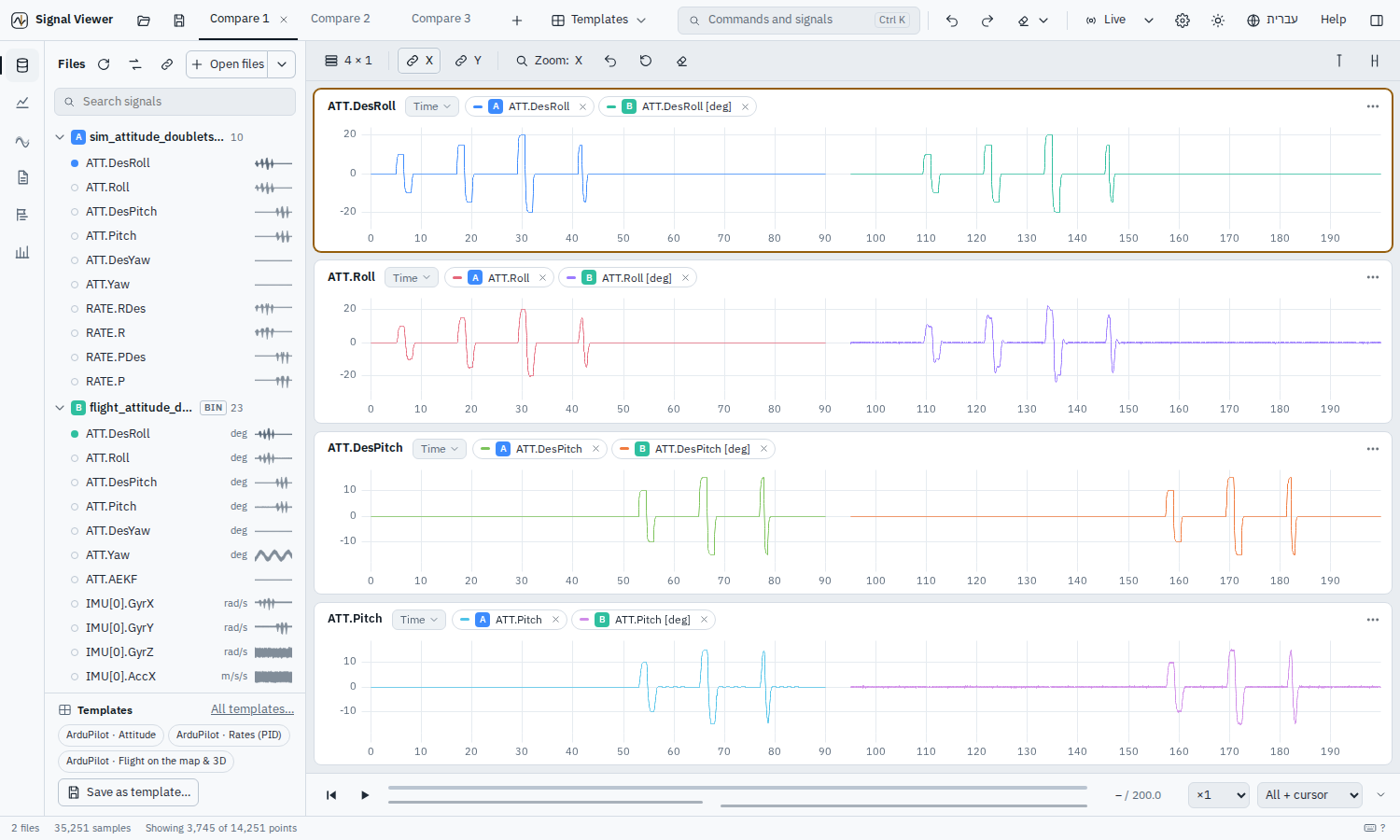
The doublets are there twice: the simulation counts from 0 s, the log from the autopilot's boot.
2. Align them in time
Right-click the flight file → Align time with another file…. The model is the reference (it keeps its time); the flight is shifted onto it. The app correlates the commands both sides share and proposes −104.369 s, correlation 0.998 (the test really began 104.37 s after boot).
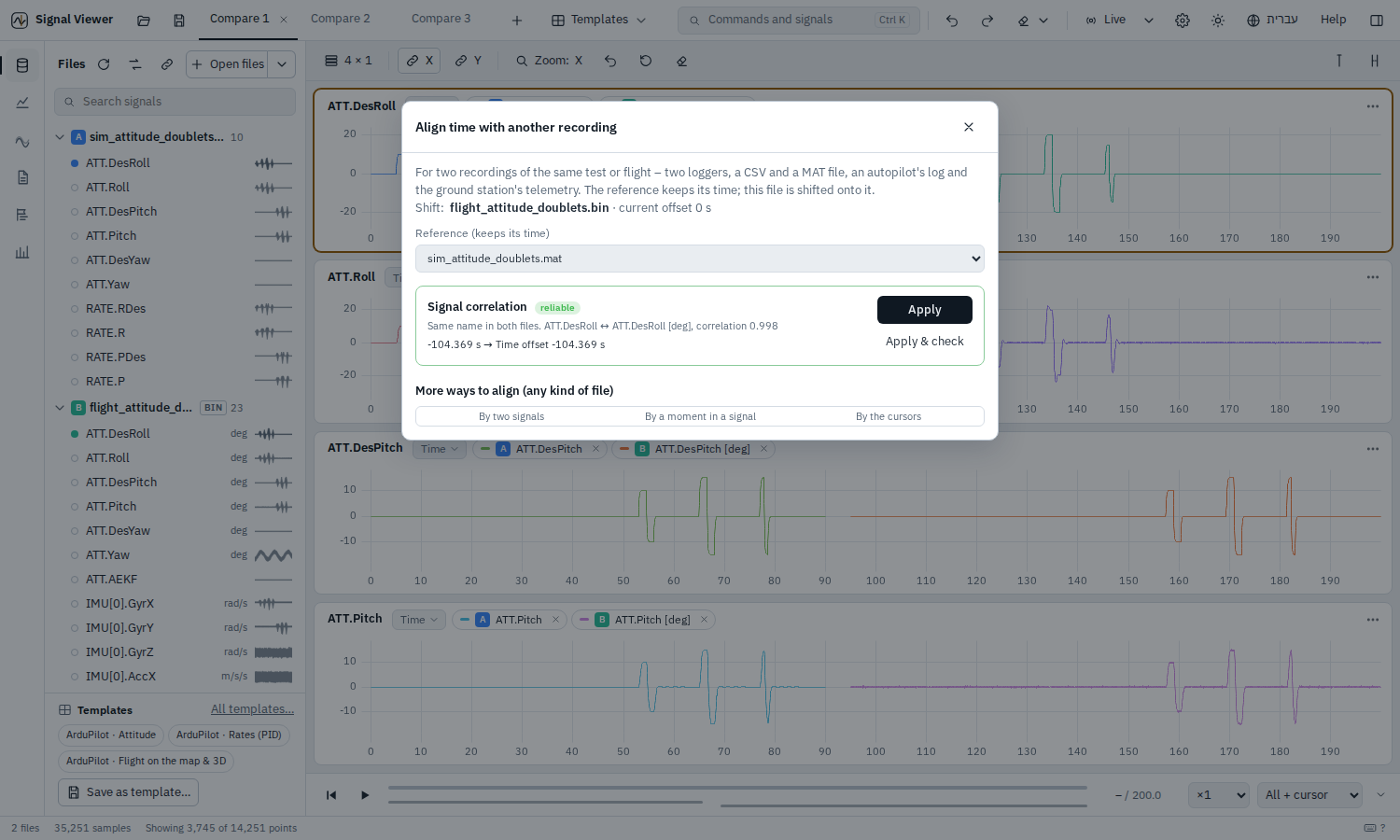
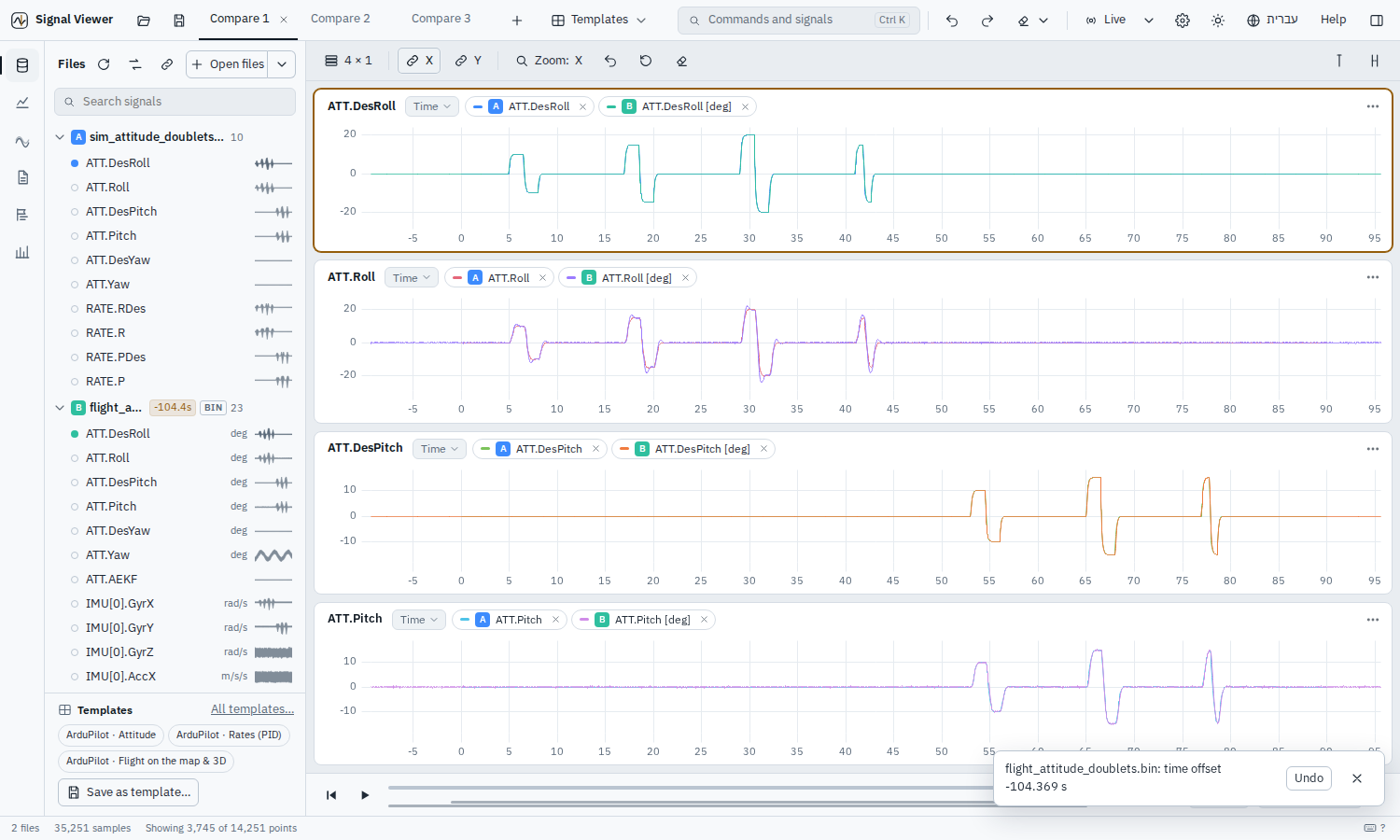
Apply: the doublets now lie on top of each other, and the offset shows next to the file
(−104.4s). Align on a command (DesRoll), not on a response: a response carries the vehicle's
own delay, which is one of the things you want to measure, not to remove.
3. Look closer
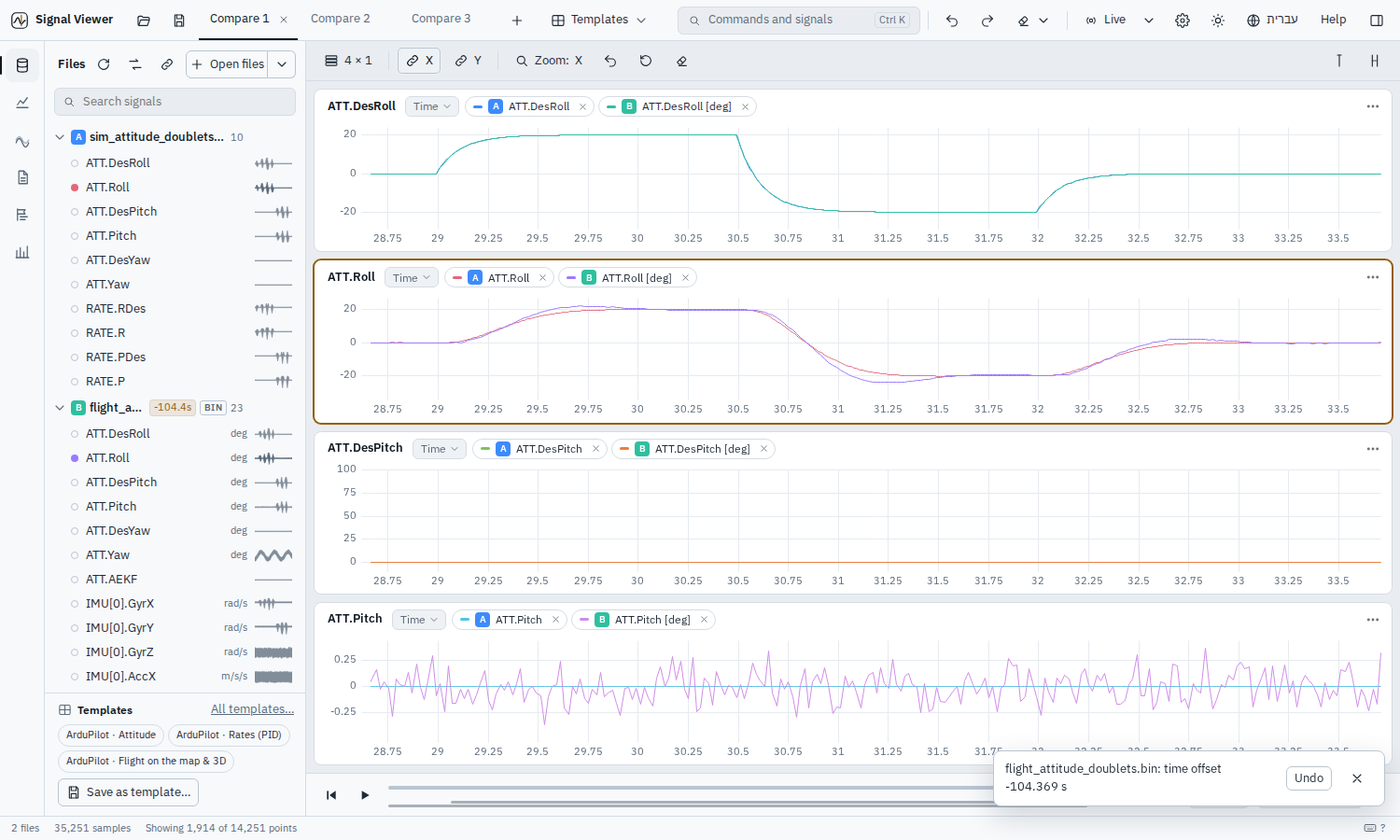
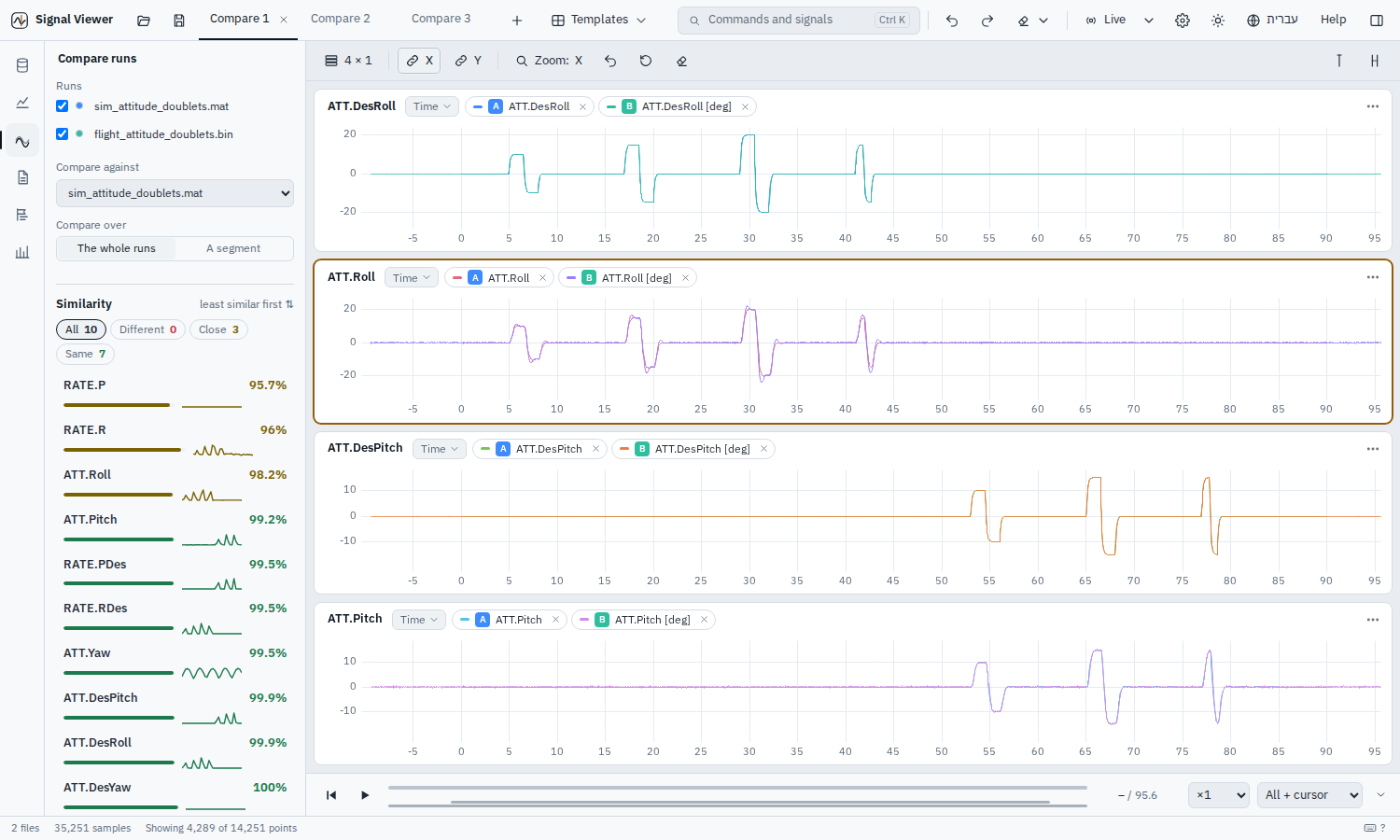
Drag over the 20° roll doublet. The commands coincide; the model (red) settles at ±20°, the vehicle (purple) overshoots to about −24° and rings once – lower damping than the model assumed. Pitch, a few plots down, follows the model.
4. Rank every signal
Compare runs (side bar), against the simulation: every signal both files have, least similar first, with a small curve of where in time they differ. The roll rate and roll angle differ at each doublet; the commands and yaw are the same; the rates are noisier in flight (a derivative of a noisy angle). Table of all signals gives the numbers; Export CSV takes them away.
More from here, all in the app:
- A − B (Create signals → two signals) – the difference itself, and how far apart the two are in each flight mode.
- Spectrum of
IMU[0].AccZ– the 82 Hz line the model never had (FFT mode on the plot). - The same segment of each run, when several flights are compared (Compare over → A segment).
5. The same check in CI
signalviewer-cli compare sim_attitude_doublets.mat flight_attitude_doublets.bin \
    --align auto --align-on ATT.DesRoll --tolerances tolerances.json
flight_attitude_doublets.bin  vs  sim_attitude_doublets.mat
        (time alignment)  - flight_attitude_doublets.bin moved by -104.369 s (correlation 0.998 on ATT.DesRoll)
  FAIL  RATE.R  - 0.089 % of samples outside ±30.0; RMS 5.598 (4.04 % of range), max |Δ| 39.32, r 0.917
  FAIL  ATT.Roll  - 1.4 % of samples outside ±3.0; RMS 0.7111 (1.76 % of range), max |Δ| 6.065, r 0.993
  ... 5 more (--top 0 shows all)
5 passed, 2 failed, 0 errors, 0 skipped
Exit code 1: the roll loop is outside the model's tolerance – exactly the finding above; pitch,
the commands and yaw pass (--top 0 lists them). What the
command does:
--align autolines the flight up with the model by cross-correlation (the app's Align);--align-onpicks the signal (default: the best-correlated of the compared ones);--align -104.37gives the shift yourself. Name the signal in CI: a limit on every single sample is sensitive to tens of milliseconds of shift, and the default may pick another signal as the data changes (hereATT.Pitch: 26 ms away, and the commandsATT.DesRollandATT.DesPitchfail too).- Names match with or without their unit. Where they differ otherwise, pair them in the
tolerances:
"signals": {"phi": {"as": "ATT.Roll", "abs": 3}}. tolerances.jsonsets the limits:"default": {"abs": 3.0}for every signal, larger for the rates,"skip": truefor what is not compared.--junit report.xmlfor the CI's test view.- A few samples outside can be allowed:
"outside_pct": 0.5(per signal or indefault) or--allow-outside 0.5passes a signal when at most 0.5 % of its samples are outside - for a spike at a step that is not the finding. HereRATE.R(0.089 % outside) would then pass andATT.Roll(1.4 %) would still fail.
The numbers in the output above may differ in the last digits on your machine; the verdict does not.