Messages: from bytes to signals
A serial port, a radio or a bus is often recorded byte by byte - one signal of whole numbers 0..255, or a
logger's columns byte_0 … byte_N with one message per row - or as a receiver's raw text ($GPGGA,…). Signal
Viewer finds the messages in it, says what it found, and - with a structure that says what each message
holds - turns them into a recording: each value a signal, with its own times, ready for plots, the map, Compare
and the report.
The Messages panel - one place for all of it
Messages on the left (beside Investigate and Report; Ctrl+K → Messages) holds everything about messages:
- Byte streams - the bytes in the open files, found by themselves (a signal of bytes, byte columns, a link
recording) or as you defined them, each with its messages at a glance: how many, the header, the checksum and its
errors, each message type and its rate. Click one to open it: what it carries, its structure and the actions -
Plot the messages, Make the recording, Add to the report (
[[messages <its name>]]at the end of the report, the definition kept). - Logs with messages - every message type of the open logs and recordings - MAVLink
.tlog, ArduPilot.bin, PX4.ulg, a link's recording, a recording made from messages - with its fields, how many and how often. A click plots that message's fields in a new tab. - Running now - a link being listened to, MAVLink being received (started and stopped in Live ▾): bytes, messages and the rate.
- Structure library - NMEA 0183 built in, your structures (
.svmsg.jsonfiles in~/.signalviewer/structures; Open the folder to copy one to a colleague or add one) and the ICD layouts of the readers folder (.icd.json, the same packets read as a structure). Offered in the panel (From the library…) and in Live ▾ → Listen to a link.
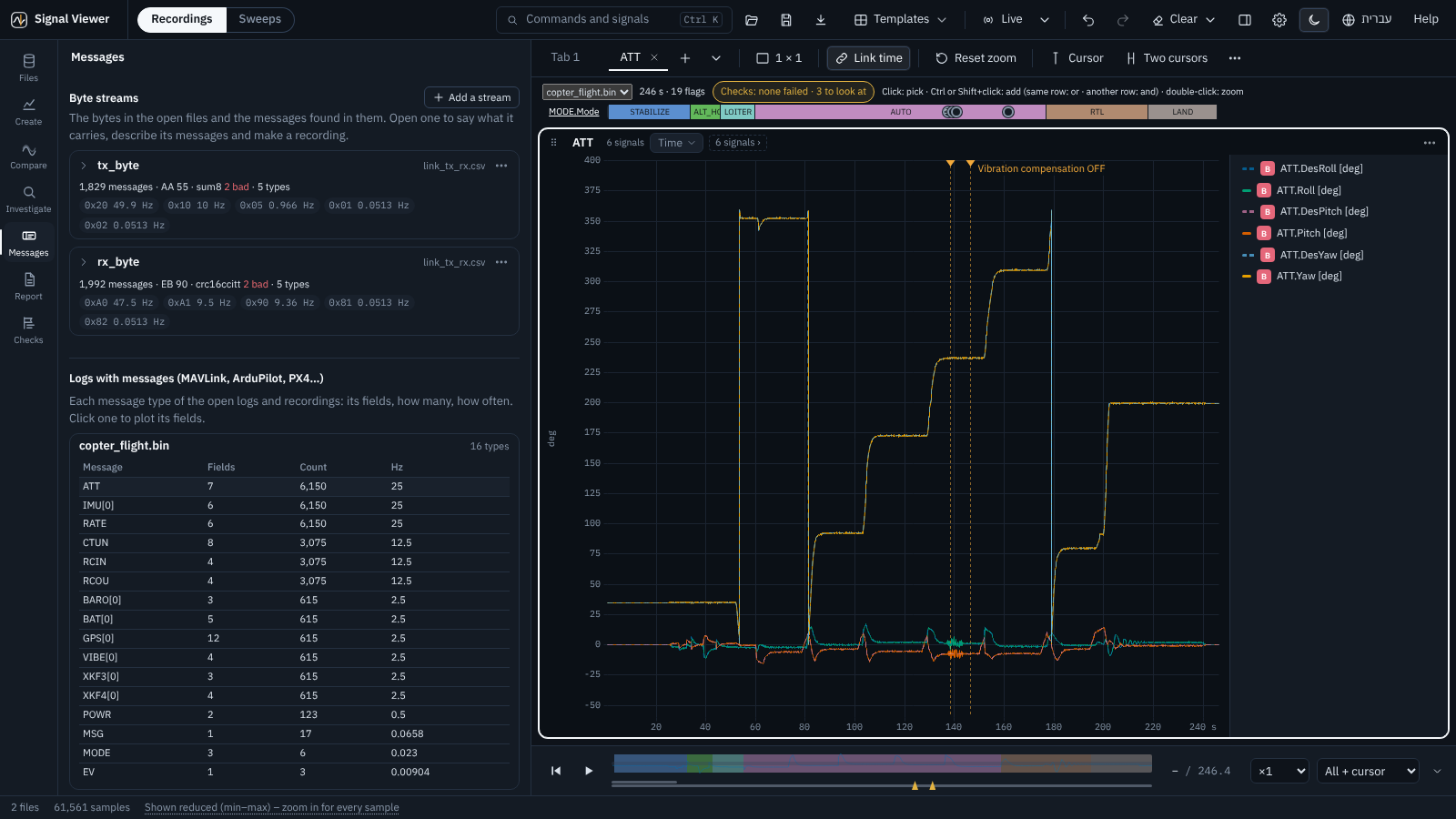
Right-click a byte signal in the list (or select the byte columns) → Decode as messages… opens the panel on it.
Add a stream at the top of Byte streams does the same for any signal of the open files - another TX, another
link - with the signals named like bytes (byte, rx, tx, raw…) first.
Each stream's ⋯: Fold, Start over (what was defined forgotten, the editor back to what the app finds),
Forget the definition (a stream the app found by itself stays listed) or Remove from the list (a stream added by
hand). They ask first and are one Undo. A recording already made from the stream stays open, but it is not made
again when the session opens.
A link recording (.svraw) opened without its structure says so, with a button to the panel.
From the raw signal to the variables - four steps
Open the stream in the panel (click it, or right-click the byte signal → Decode as messages…). It opens on four numbered steps; each says what to do, and steps 2 and 3 follow every change at once.
Step 1 - what the signal carries
| Choice | When | Example |
|---|---|---|
| Only TX / only RX | one direction in one signal | tx_byte |
| Both - a column says the direction of each byte | one signal with both ways, and any column beside it with 2 to 32 values (dir = TX / RX, a node address 5 / 9 / 12, a port...); choose it, then which of its values is TX and which is RX (each value shown with how many samples have it). Bytes with the column's other values are in neither direction - the panel says how many |
byte + dir in link_mixed.csv |
| TX and RX - one signal each | two signals selected | tx_byte and rx_byte in link_tx_rx.csv |
With two directions, steps 2-4 are done for each (the TX / RX switch at the top of step 2).
Step 2 - find the messages in the bytes
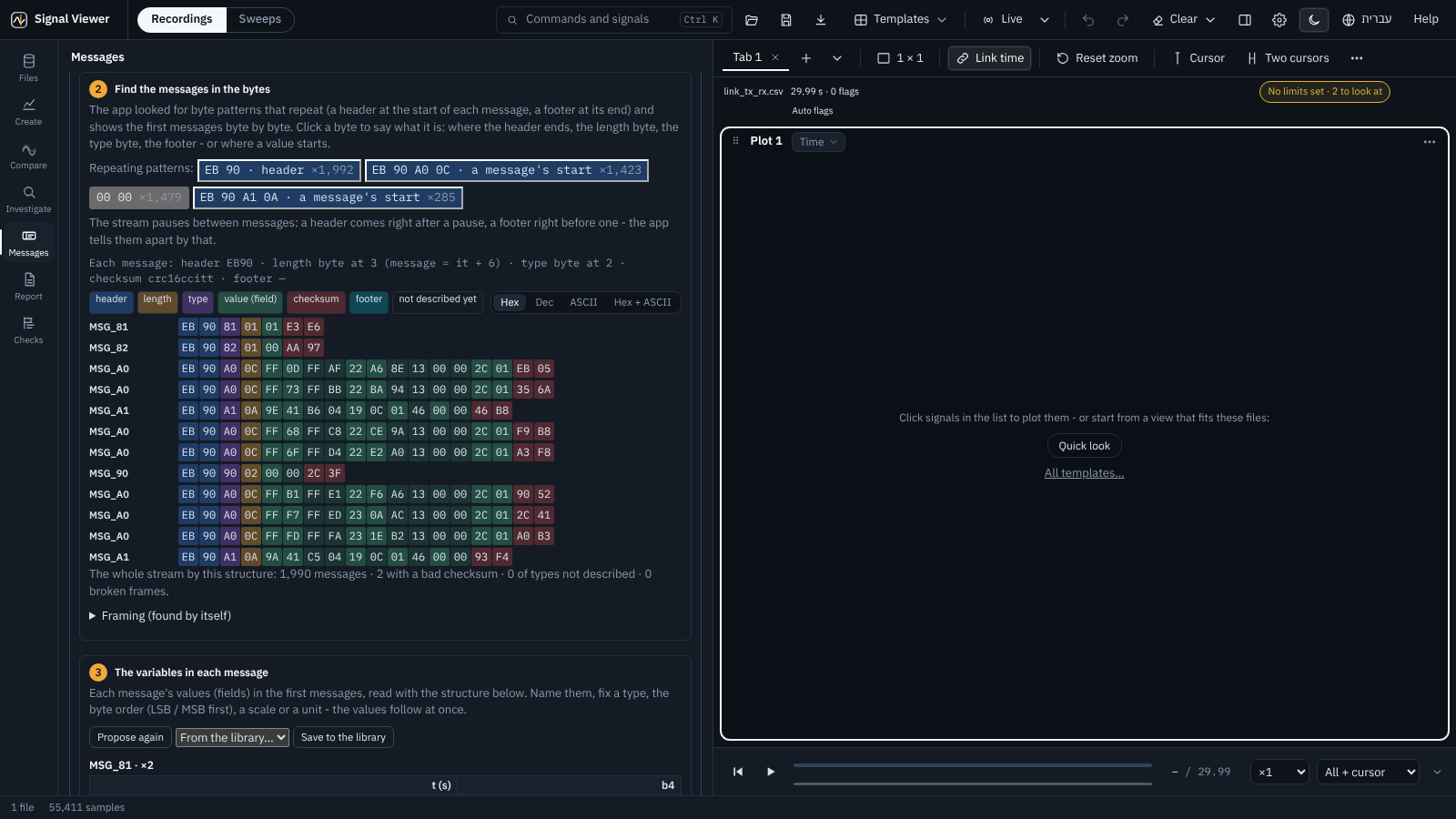
The app looks for byte patterns that repeat and proposes the message's template by itself - nothing to press:
- Repeating patterns - the sequences of 2-4 bytes that recur, with how often: the header (
EB 90 · header), a message's start (the header and the type / length bytes that always follow it), the footer (0D 0A · footer) and any other. Click one: Use as the header or Use as the footer - the template is proposed again around it. - By the time - when the stream pauses between messages (the line quiet longer than between a message's own bytes, or bytes stamped one time per packet), a header comes right after a pause and a footer right before one. The app uses that to tell them apart - from the bytes alone a recording that starts inside a message frames as well from its footer as from its header. Each pattern's tooltip says how often it comes right after / right before a pause, and a pattern that is not the header or the footer yet is marked starts a message / ends a message (by the time). A stream sent back to back with no pauses: the time says nothing, and nothing is read from it.
- The template in one line -
Each message: header EB90 · length byte at 3 (message = it + 6) · type byte at 2 ·
  checksum crc16ccitt · footer -
. - The first messages byte by byte, each byte coloured by what it is: header, length, type, a value (field), checksum, footer - grey: not described yet. Click a byte to say what it is: The header is these bytes, The length byte, The type byte, The footer: from here to the end, A value starts here (8 / 16 / 32-bit, signed or not, LSB first or MSB first, float, double - each choice shows the value it reads there), Text (ASCII) starts here (to the end of the values, or 4 / 8 / 16 bytes) or Not a value. A type byte proposed where there is none: Not the type byte - one kind of message, the clicked message's values kept.
- Hex · Dec · ASCII · Hex + ASCII (above the bytes) - each byte as hex, as a number, as its character, or hex with
the character under it. Point at a byte: what the bytes from it read as - 16 / 32-bit LSB and MSB first, float,
double, text - before anything is defined. A text stream (
$GPGGA,…) shows each sentence's parts between the commas; click a part to make it a field (number, text, latitude, longitude, time of day). - When no message is found yet, the stream's first bytes are shown: click the byte where a message starts.
- Below: the whole stream by this template - how many messages, how many with a bad checksum, of types not described, broken frames (every message counts).
Step 3 - the variables in each message
Each message's values in the first messages, read with the template - a wrong byte order, offset or scale shows at
once - and the template itself as a form or as its JSON: name the values, fix a type, the byte order
(LSB / MSB first), a scale, an add, a formula on the raw value x (x*0.01 - 40), a unit. A value of several
bytes is one field: 2 bytes LSB or MSB first (u16 / i16), 3, 4, or 8 for a double (f64); text is ascii with
its length in bytes. The proposal guesses each value from how it moves from one message to the
next - a 16-bit value LSB first or MSB first (whichever reads smooth), signed when it crosses zero, a 32-bit
integer, a 32-bit float, a double (8 bytes), text (3 or more printable characters), a counter (8 or 16-bit), flags,
else a byte - and names it by place (value_4, b10). Text sentences
($…,…*HH) are proposed as NMEA - the sentences it knows with their fields, any other sentence's fields by place.
In the form each message is a card - its id and name, how many fields, ▾ to fold it - and each field one row: name,
byte (or index), type, byte order, unit, then its conversion (ƒ, or what it is: ×0.01 -40, a formula) that opens
the scale, add and formula under the row, and its own ✕. A field removed comes back with Undo in the notice; a
whole message goes only from its own 🗑, after a question that says how many fields go with it.
- Propose again - forget the edits and propose from the stream.
- From the library… - NMEA 0183 (built in: GGA, RMC, VTG, GSA, GSV, GLL, ZDA), yours, an ICD layout - or A structure file… anywhere on the disk.
- Save to the library - under a name, as a
.svmsg.jsonfile, for the next recording or a live link.
Step 4 - make the recording
- The messages in the stream - every message with how many times it came and its share of the stream, the most first (a histogram of the messages), the types the structure does not describe yet too (type 0x20 - not described, step 3). Untick a message to leave its values out of the recording - it is still counted and still in the order. Plot beside a message puts its variables in a tab of their own, a plot per variable (the recording is made first when it is not yet).
- Which message passed when - the recording has a signal
message: at each message's time, its name (a state, like a flight mode). Its tab shows it as a lane under every plot - the messages in order; zoom in to read each name. Like any signal it can be plotted, compared, exported or used in a condition (message == "MSG_A0"). - Make the recording - the values become a recording of their own (rx_byte - messages), plotted one plot per message, in the file list like any opened file: plots, Compare, the map, the report. The definition is kept in the session: opening the session makes the recording again.
- Save as a file (CSV, Parquet, MAT, HDF5)… - the recording's values written as a file the app (or anything else) opens like any input.
- Plot the messages - a tab of the stream itself: the bytes, the message type, the length, the interval, checksum good / bad, and with both directions the reply latency.
- Add to the report -
[[messages <its name>]]at the end of the report: the framing, a table per message type, the order, rates, gaps, requests and replies, the handshake (see Writing a report). Report → Ready reports → Link review writes it all.
The structure file
A binary structure
{"kind": "binary", "name": "Vehicle -> ground", "header": "EB90",
 "length": {"offset": 3, "add": 6},          "type": {"offset": 2},
 "checksum": {"scheme": "crc16ccitt", "from": 2},
 "messages": [
  {"id": 160, "name": "ATTITUDE", "fields": [
    {"name": "roll",  "offset": 4,  "type": "i16", "endian": "be", "scale": 0.01, "unit": "deg"},
    {"name": "yaw",   "offset": 8,  "type": "u16", "endian": "be", "scale": 0.01, "unit": "deg"},
    {"name": "alt",   "offset": 10, "type": "i32", "endian": "le", "scale": 0.01, "unit": "m"}]},
  {"id": 161, "name": "STATUS", "fields": [
    {"name": "mode",  "offset": 10, "type": "u8", "labels": {"1": "MANUAL", "2": "AUTO"}},
    {"name": "armed", "offset": 11, "type": "u8", "bits": [0, 1]}]}]}
- Offsets count from 0 at the header's first byte.
length: the frame's length = that byte +add(no length byte:"size"for all, a"size"per message, or a footer it ends with).footer: fixed bytes every message ends with, in hex ("0D0A","03"). A message whose end is not its footer is broken (left out, counted); without a length byte or a size, a message ends at its footer. A checksum sits just before the footer. The app proposes a footer when every message ends with the same bytes.type: the byte that tells the messages apart (idis its value).checksum: in the last 1 or 2 bytes, over the bytes fromfromup to it -sum8,xor8,negsum8,notsum8,crc16ccitt(MSB first),crc16modbus(LSB first),fletcher16(as UBX). A message whose checksum fails is left out and counted.- Field types:
u8 i8 u16 i16 u24 i24 u32 i32 f32 f64(f64: a double, 8 bytes) andascii(text ofsizebytes - up to a NUL; a recording's text value, like a flight mode);endian:le= LSB first (little-endian),be= MSB first (big-endian). The value = raw ×scale+add, or aformulaon the raw valuex- any formula the app knows:"x*0.01 - 40","(x - 32) / 1.8","where(x > 32767, x - 65536, x)"(then scale and add are not used);bits: [first, how many]takes bits out of it;labelsgives text to values.
A text structure (NMEA and the like)
{"kind": "text", "name": "NMEA 0183", "start": "$", "sep": ",", "checksum": "nmea",
 "messages": [
  {"id": "GGA", "name": "GGA", "fields": [
    {"name": "time", "index": 1, "type": "hhmmss", "unit": "s"},
    {"name": "lat",  "index": 2, "type": "lat", "hemi": 3, "unit": "deg"},
    {"name": "lon",  "index": 4, "type": "lon", "hemi": 5, "unit": "deg"},
    {"name": "alt",  "index": 9, "type": "number", "unit": "m"}]}]}
- A sentence starts with
start, ends at the end of its line (or atendwhen given, e.g."#"), and its values are separated bysep;indexis a value's place (the sentence's name is 0);"checksum": "nmea"checks*HH(a sentence that fails is left out and counted). - A message's
idmatches the sentence's name whole or without its two-letter talker:GGAreads$GPGGAand$GNGGA. - Types:
number,int,text(text values),lat/lon(ddmm.mmmm/dddmm.mmmmwith the hemisphere's place inhemi- S and W negative),hhmmss(seconds of the day),ddmmyy(days since 2000-01-01). - The time of a sentence is the time of its first byte in a recorded stream; in a
.nmeafile, its own time field (a sentence without one takes the last seen).
A raw NMEA file
A .nmea file opens like any recording: its sentences by the NMEA structure, the time from their own clock -
GGA.lat, GGA.lon, GGA.alt, RMC.speed, GSA.hdop… - and its position is a track on the map. A sentence with
a wrong checksum is left out; one the structure does not know is counted (the load report says which).
Live: listen to a serial port, UDP or TCP
Live (the ▾ beside it) → Listen to a link (serial / UDP / TCP):
| Connection | Means |
|---|---|
COM5, /dev/ttyUSB0 + baud |
a serial port (UART) - with pyserial installed |
udp:0.0.0.0:5600 |
listen on a UDP port (any sender) |
tcp:192.168.1.10:4001 |
connect to a device or a serial-to-network server |
tcpin:0.0.0.0:4001 |
wait for a device to connect |
Choose the messages: a structure of the library (NMEA 0183, yours, an ICD layout), a structure file
(.svmsg.json), a structure kept in this session, or bytes - decode them later. Listen: what comes in is recorded to a file in the
recordings folder (link-<date>-<time>.svraw - each chunk with its receive time, the structure beside it as
.svmsg.json), and as soon as the first bytes arrive the app opens it and follows it live: the messages' signals
grow on the plots and the map as they come. Nothing is ever sent. Stop keeps the file - a recording like any
other: open it again, compare it, export it (Export recording: CSV, Parquet…), put it in a report.
To try it without a device, the examples' streams can be played over the network in real time:
python tools/send_link_demo.py                          # the sensor board -> udp 127.0.0.1:5600
python tools/send_link_demo.py --what nmea              # the GPS receiver's NMEA
python tools/send_link_demo.py --what tx --to tcp:0.0.0.0:4001   # serve TCP; the app connects to tcp:127.0.0.1:4001
then Listen on udp:0.0.0.0:5600 with examples/serial_link/sensor.svmsg.json (or NMEA 0183).
The examples (Help → Examples)
| Example | What it shows |
|---|---|
| a serial link, byte by byte | the messages found by themselves (TX: header AA 55, a length byte, sum8; RX: EB 90, CRC-16), a handshake, commands and their ACKs, lost ones, a retry, a dropout and a reconnect - in a Link review report |
| messages to signals | the same link with its two structure files (link_tx.svmsg.json, link_rx.svmsg.json): angles MSB first and LSB first, a 32-bit altitude, a float, flag bits, scales and units - two recordings, plotted |
(in the same folder) sensor_uart.csv + sensor.svmsg.json |
a sensor board with a footer and no length byte: A5 5A, type, payload, xor8, 0D 0A - IMU (i16 LSB first), barometer (a 32-bit pressure), magnetometer (MSB first); opened in Messages, step 2 finds the header, the footer, the xor8 before it and every field's type and byte order |
| a GPS receiver's raw NMEA | receiver.nmea opens as a recording at once (a loop on the map, the fix lost for 5 s, one bad checksum, a maker's own $PDEMO sentence); receiver_uart.csv is the same receiver byte by byte - open it in Messages: step 2 proposes NMEA |